

Our NAS’LERs report from their daily project work
Evaluations play an important role in companies in order to analyze processes and results and thus make future development plannable.
In my experience, evaluations, be they sales, inventory, or project evaluations, are still too often done in Excel today.
The raw data is usually manually copied into a created template, calculations are performed, and graphics are created for the next PowerPoint presentation.
Nowadays, there are far better solutions for this, which retrieve the data automatically, enhance it and present it in a visually appealing way.
Power BI for Reporting
Power BI is the BI solution we like to implement for our Business Central customers to simplify reporting.
Recently, we were approached by a customer who would like to have evaluations of product sales per article category, article and month in comparison to the previous year, which, according to the customer’s wishes, do not exist in Business Central.
Instead of creating this evaluation as a rigid report in Business Central with a lot of effort, I presented the possibilities that Power BI offers.
I was able to quickly convince our customer of the benefits, so I was able to start setting up the Power BI service.
After preparing in Business Central to provide the data, I was able to connect to Business Central in Power BI and load the desired tables into the dataset.
So that Power BI is able to connect e.g. the articles and the posted invoices and filter the sold quantities per article category, I have created relationships between the tables.
Once the basis for the analyses, i.e. the linked data, is uploaded to the Power BI service, I can use it as the basis for countless reports. If other requirements are added later, for which additional data is needed that is not available in the dataset, I can simply extend the dataset.
The next step is to create the individual report. To do this, I connected to the dataset in the service with just a few clicks and then merged the relevant fields into my evaluations.
The big advantage is that Power BI analyzes the relationships through my linked tables and does meaningful calculations for me. This way I don’t have to calculate all sales invoices for the sales of one item category. Power BI does this all by itself.
Unfortunately, Power BI does not provide me with some values, such as the difference between the current year’s values and the previous year’s values.
However, I can create calculations, known as measures, in Power BI to compute these.
I have presented the comparison of the annual and monthly values once in tabular form and once as a bar chart. This makes it possible to see at a glance via the chart how sales have developed in the various years. More detailed information can be found in the table.
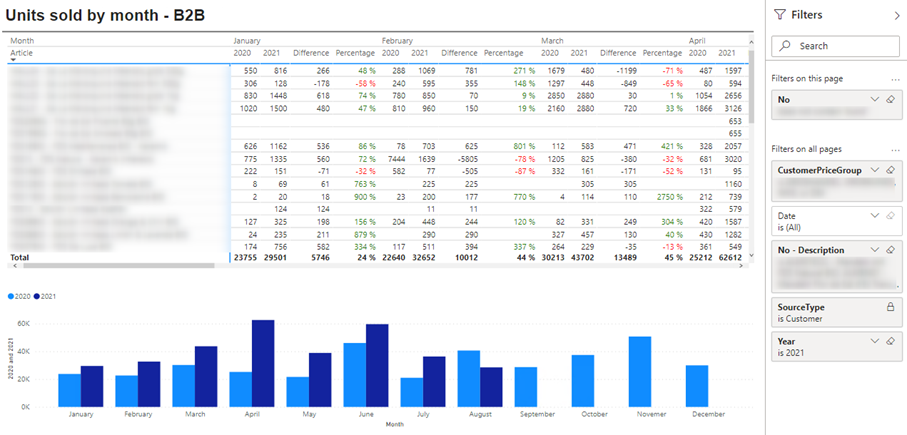
The creation of additional graphics is quickly solved in Power BI. By selecting a different visualization, Power BI converts, for example. converts a table into a pie chart.
A great advantage of Power BI reports are the countless filtering options that can be added during creation, making the evaluations of the visualizations very dynamic.
I also published the report to the Power BI service so that users with the appropriate permissions could access it.
Last but not least, I set up an automatic refresh of the data that updates the dataset several times a day with the data from Business Central.
I am already curious which evaluations will be requested soon, which I can then present in Power BI in an appealing way.
Tobias Wirths
If you also need support from us, then feel free to contact us